Difference between revisions of "PPTP Android"
From BTGuard Wiki
| (7 intermediate revisions by the same user not shown) | |||
| Line 1: | Line 1: | ||
| − | <div class=" | + | <div class="wrapper4"> |
| − | <div class=" | + | <div class="wrapleft4"> |
| − | <div class=" | + | <div class="left4"> |
| − | <span class="plainlinks">[ | + | <span class="plainlinks">[https://wiki.btguard.com/images/0/04/Pptp_android_1.png https://wiki.btguard.com/images/0/04/Pptp_android_1.png]</span> |
</div> | </div> | ||
</div> | </div> | ||
| − | <div class=" | + | <div class="right4"> |
<p> | <p> | ||
== Setup Instructions == | == Setup Instructions == | ||
| Line 14: | Line 14: | ||
</div> | </div> | ||
| − | <div class=" | + | <div class="wrapper4"> |
| − | <div class=" | + | <div class="wrapleft4"> |
| − | <div class=" | + | <div class="left4"> |
| − | <span class="plainlinks">[ | + | <span class="plainlinks">[https://wiki.btguard.com/images/6/68/Pptp_android_2.png https://wiki.btguard.com/images/6/68/Pptp_android_2.png]</span> |
</div> | </div> | ||
</div> | </div> | ||
| − | <div class=" | + | <div class="right4"> |
<p> | <p> | ||
2. Hit '''Add VPN Profile'''<br/> | 2. Hit '''Add VPN Profile'''<br/> | ||
| Line 29: | Line 29: | ||
Hit '''Show advanced options'''<br/> | Hit '''Show advanced options'''<br/> | ||
DNS servers: '''8.8.8.8'''<br/> | DNS servers: '''8.8.8.8'''<br/> | ||
| + | <br/> | ||
3. Hit '''Save'''<br/> | 3. Hit '''Save'''<br/> | ||
| + | <br/> | ||
| + | Setup Complete! | ||
<br/> | <br/> | ||
</p> | </p> | ||
</div> | </div> | ||
</div> | </div> | ||
| − | <div class="wrapper"> | + | |
| − | <div class=" | + | |
| − | <div class=" | + | <div class="wrapper"><br/> |
| − | <span class="plainlinks">[ | + | ---- |
| + | <br/></div> | ||
| + | |||
| + | |||
| + | <div class="wrapper4"> | ||
| + | <div class="wrapleft4"> | ||
| + | <div class="left4"> | ||
| + | <span class="plainlinks">[https://wiki.btguard.com/images/5/5a/Pptp_android_3.png https://wiki.btguard.com/images/5/5a/Pptp_android_3.png]</span> | ||
</div> | </div> | ||
</div> | </div> | ||
| − | <div class=" | + | <div class="right4"> |
<p> | <p> | ||
| − | + | == How To Connect == | |
| + | 1. Click on '''BTGuard''' <br/> | ||
<br/> | <br/> | ||
</p> | </p> | ||
| Line 48: | Line 59: | ||
</div> | </div> | ||
| − | <div class=" | + | <div class="wrapper4"> |
| − | <div class=" | + | <div class="wrapleft4"> |
| − | <div class=" | + | <div class="left4"> |
| − | <span class="plainlinks">[ | + | <span class="plainlinks">[https://wiki.btguard.com/images/5/53/Pptp_android_4.png https://wiki.btguard.com/images/5/53/Pptp_android_4.png]</span> |
</div> | </div> | ||
</div> | </div> | ||
<div class="right"> | <div class="right"> | ||
<p> | <p> | ||
| − | + | 2. Type in login information<br/> | |
| − | + | ''Both username and password are case sensitive. Make sure not to add/forget Capital Letters.'' <br/> | |
| + | <br/> | ||
| + | 3. Hit '''Connect''' | ||
<br/> | <br/> | ||
</p> | </p> | ||
</div> | </div> | ||
</div> | </div> | ||
Latest revision as of 20:03, 25 November 2014
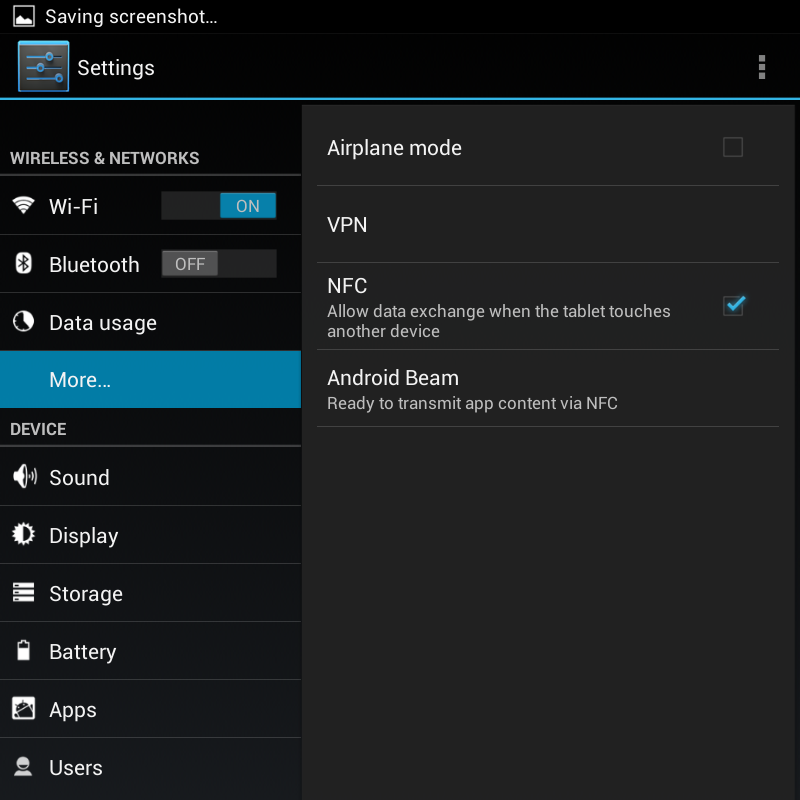
Setup Instructions
1. Go to Settings > Wireless & Networks > More > VPN
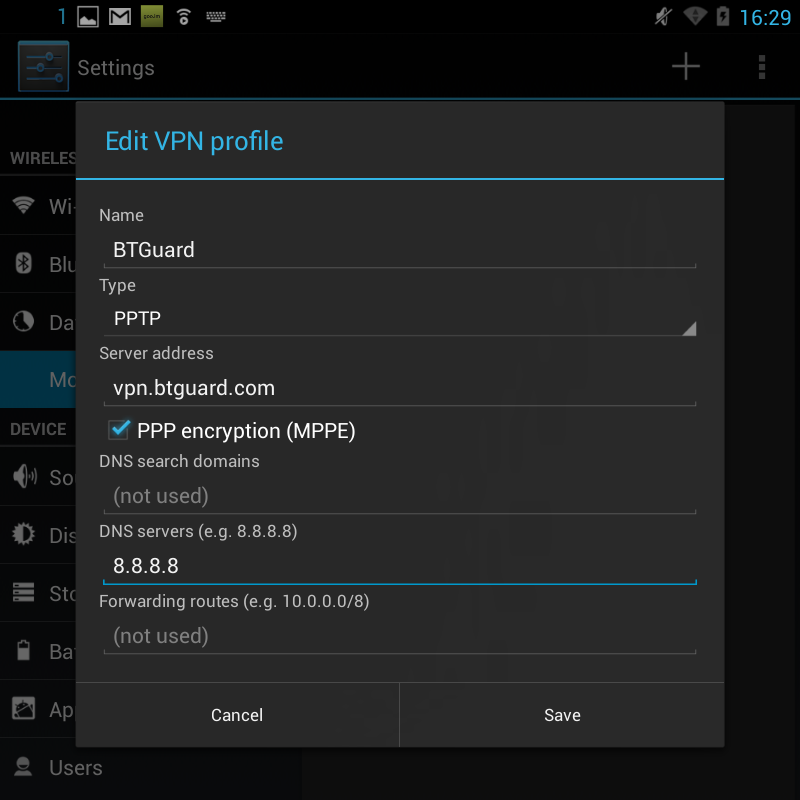
2. Hit Add VPN Profile
Name: BTGuard
Type: PPTP
Server address: vpn.btguard.com (or ca.vpn.btguard.com or eu.vpn.btguard.com or sg.vpn.btguard.com)
PPP encryption (MPPE) ON
Hit Show advanced options
DNS servers: 8.8.8.8
3. Hit Save
Setup Complete!
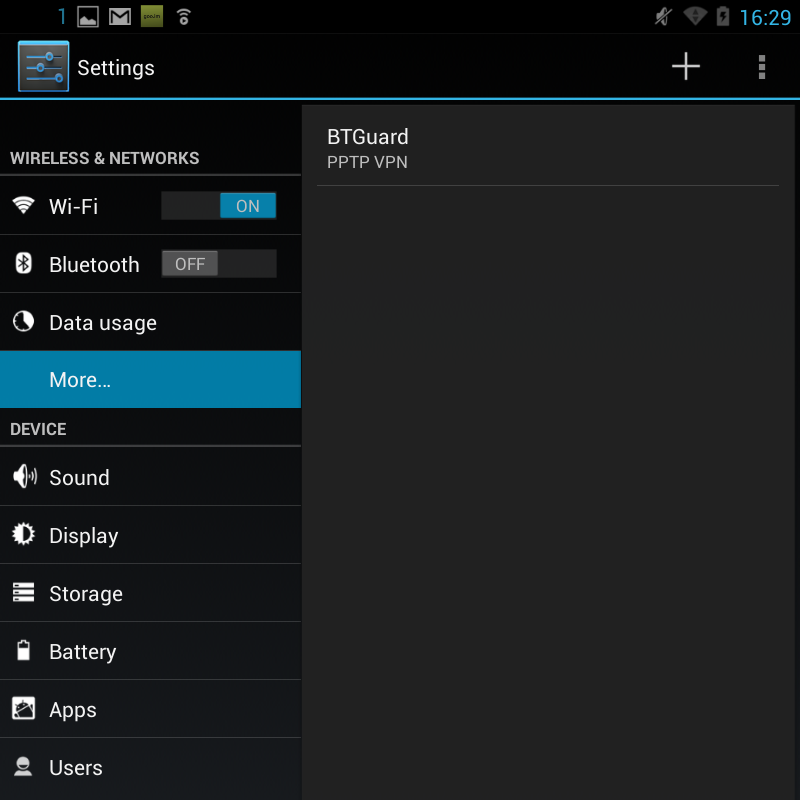
How To Connect
1. Click on BTGuard
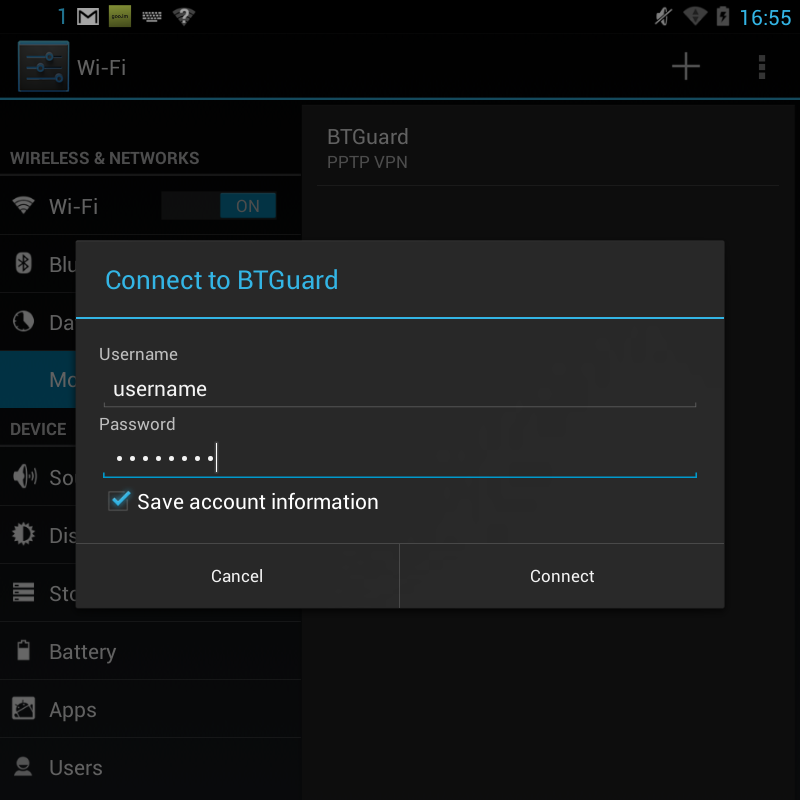
2. Type in login information
Both username and password are case sensitive. Make sure not to add/forget Capital Letters.
3. Hit Connect
