Difference between revisions of "PPTP iOS8"
| (2 intermediate revisions by the same user not shown) | |||
| Line 1: | Line 1: | ||
| + | <div class="wrapper"> | ||
| + | <div class="errorx" style=margin-top:40px> | ||
| + | <p> | ||
| + | ''' For iOS 10 users: PPTP is NOT supported anymore ''' <br/> | ||
| + | If you have just upgraded to iOS 10, your previous VPN connection will not work.<br/><br/> | ||
| + | Please use the OpenVPN protocol:<br/> | ||
| + | [[OpenVPN_iOS|Click here for instructions for iOS users.]] | ||
| + | |||
| + | <br/> | ||
| + | </p> | ||
| + | </div> | ||
| + | </div> | ||
| + | |||
| + | |||
| + | |||
<div class="wrapper3"> | <div class="wrapper3"> | ||
<div class="wrapleft3"> | <div class="wrapleft3"> | ||
| − | <div class="left3"> | + | <div class="left3"><br/><br/> |
| − | <span class="plainlinks">[https://wiki.btguard.com/images/pptp_ios_1. | + | <span class="plainlinks">[https://wiki.btguard.com/images/pptp_ios_1.png https://wiki.btguard.com/images/pptp_ios_1.png]</span> |
</div> | </div> | ||
</div> | </div> | ||
| − | <div class="right3"> | + | <div class="right3"><br/><br/> |
<p> | <p> | ||
== Setup Instructions for iOS 8 ([[PPTP_iOS|older version here]]) == | == Setup Instructions for iOS 8 ([[PPTP_iOS|older version here]]) == | ||
| Line 16: | Line 31: | ||
<div class="wrapleft3"> | <div class="wrapleft3"> | ||
<div class="left3"> | <div class="left3"> | ||
| − | <span class="plainlinks">[https://wiki.btguard.com/images/pptp_ios_2. | + | <span class="plainlinks">[https://wiki.btguard.com/images/pptp_ios_2.png https://wiki.btguard.com/images/pptp_ios_2.png]</span> |
</div> | </div> | ||
</div> | </div> | ||
| Line 29: | Line 44: | ||
<div class="wrapleft3"> | <div class="wrapleft3"> | ||
<div class="left3"> | <div class="left3"> | ||
| − | <span class="plainlinks">[https://wiki.btguard.com/images/pptp_ios_3. | + | <span class="plainlinks">[https://wiki.btguard.com/images/pptp_ios_3.png https://wiki.btguard.com/images/pptp_ios_3.png]</span> |
</div> | </div> | ||
</div> | </div> | ||
| Line 42: | Line 57: | ||
<div class="wrapleft3"> | <div class="wrapleft3"> | ||
<div class="left3"> | <div class="left3"> | ||
| − | <span class="plainlinks">[https://wiki.btguard.com/images/pptp_ios_4. | + | <span class="plainlinks">[https://wiki.btguard.com/images/pptp_ios_4.png https://wiki.btguard.com/images/pptp_ios_4.png]</span> |
</div> | </div> | ||
</div> | </div> | ||
| Line 75: | Line 90: | ||
<div class="wrapleft3"> | <div class="wrapleft3"> | ||
<div class="left3"> | <div class="left3"> | ||
| − | <span class="plainlinks">[https://wiki.btguard.com/images/pptp_ios_5. | + | <span class="plainlinks">[https://wiki.btguard.com/images/pptp_ios_5.png https://wiki.btguard.com/images/pptp_ios_5.png]</span> |
</div> | </div> | ||
</div> | </div> | ||
| Line 89: | Line 104: | ||
<div class="wrapleft3"> | <div class="wrapleft3"> | ||
<div class="left3"> | <div class="left3"> | ||
| − | <span class="plainlinks">[https://wiki.btguard.com/images/pptp_ios_6. | + | <span class="plainlinks">[https://wiki.btguard.com/images/pptp_ios_6.png https://wiki.btguard.com/images/pptp_ios_6.png]</span> |
</div> | </div> | ||
</div> | </div> | ||
| Line 102: | Line 117: | ||
<div class="wrapleft3"> | <div class="wrapleft3"> | ||
<div class="left3"> | <div class="left3"> | ||
| − | <span class="plainlinks">[https://wiki.btguard.com/images/pptp_ios_7. | + | <span class="plainlinks">[https://wiki.btguard.com/images/pptp_ios_7.png https://wiki.btguard.com/images/pptp_ios_7.png]</span> |
</div> | </div> | ||
</div> | </div> | ||
Latest revision as of 11:45, 21 October 2016
For iOS 10 users: PPTP is NOT supported anymore
If you have just upgraded to iOS 10, your previous VPN connection will not work.
Please use the OpenVPN protocol:
Click here for instructions for iOS users.
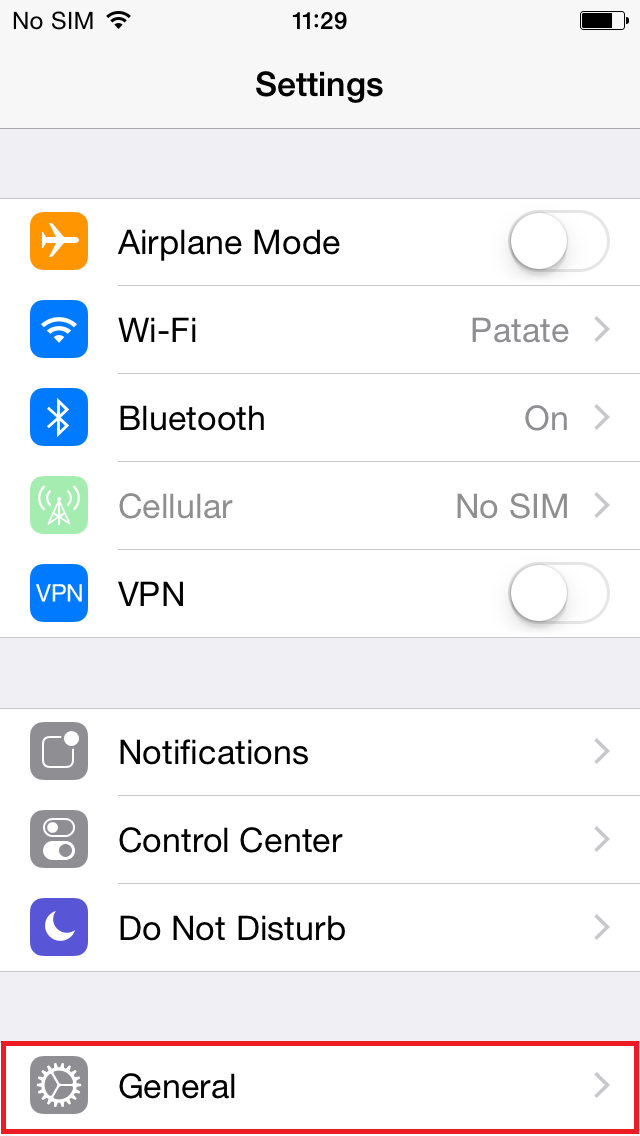
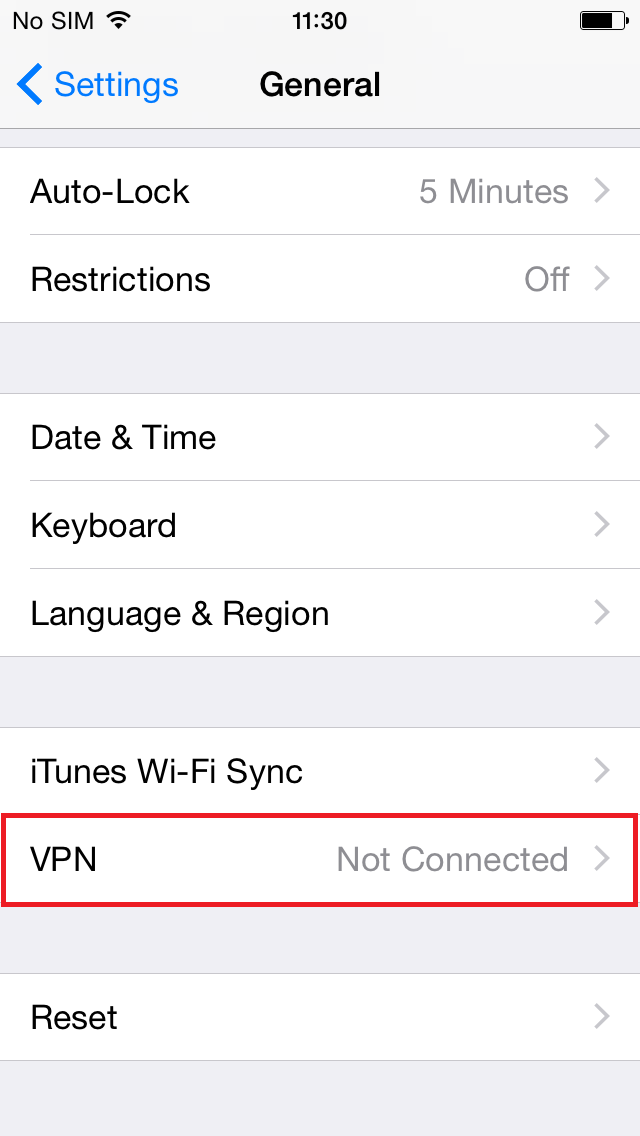
2. Tap on VPN
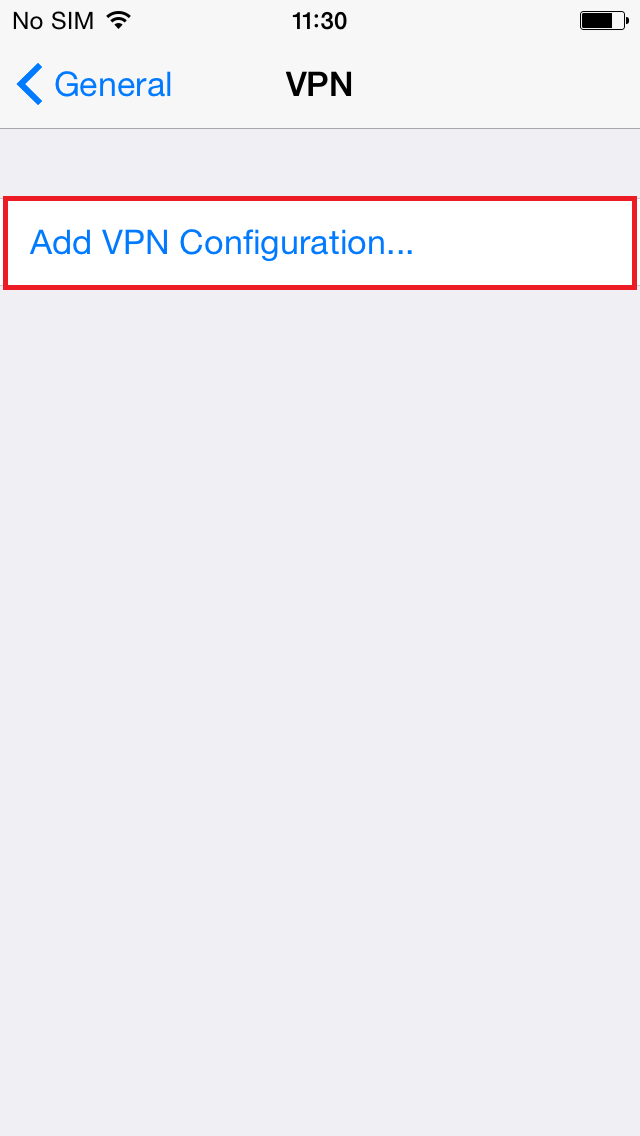
3. Tap on Add VPN Configuration
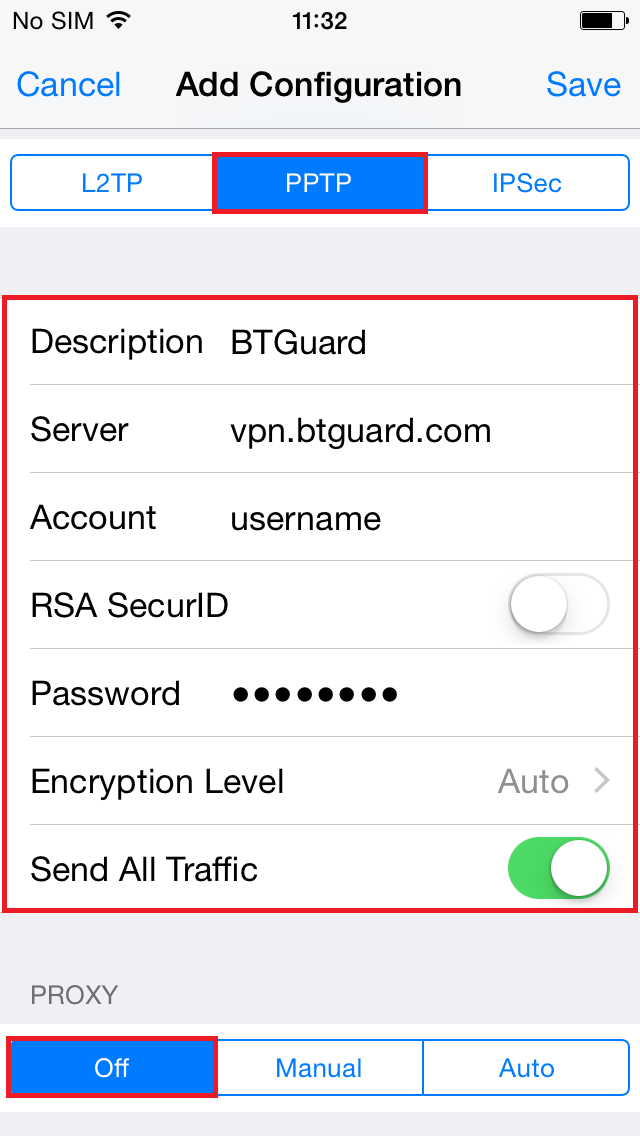
4. Select PPTP
5. In the box below PPTP, enter the following information:
Description: BTGuard
Server: vpn.btguard.com
Optional: To manually select your server location, please use ca.vpn.btguard.com for Canada or eu.vpn.btguard.com for Europe or sg.vpn.btguard.com for Singapore.
Account: Your username
RSA SecurID: OFF
Password: Your Password
Encryption Level: Auto
Send All Traffic: ON
Both username and password are case sensitive. Make sure not to add/forget Capital Letters.
6. Hit Save
Setup Complete!
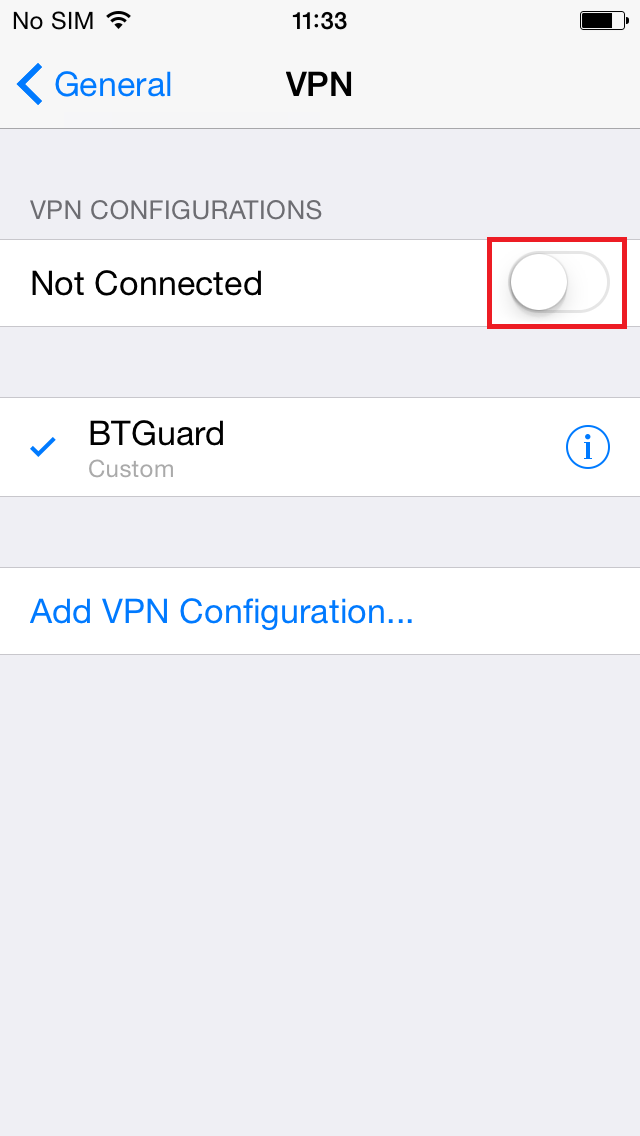
How To Connect
1. Go to Settings and hit on the button next to VPN
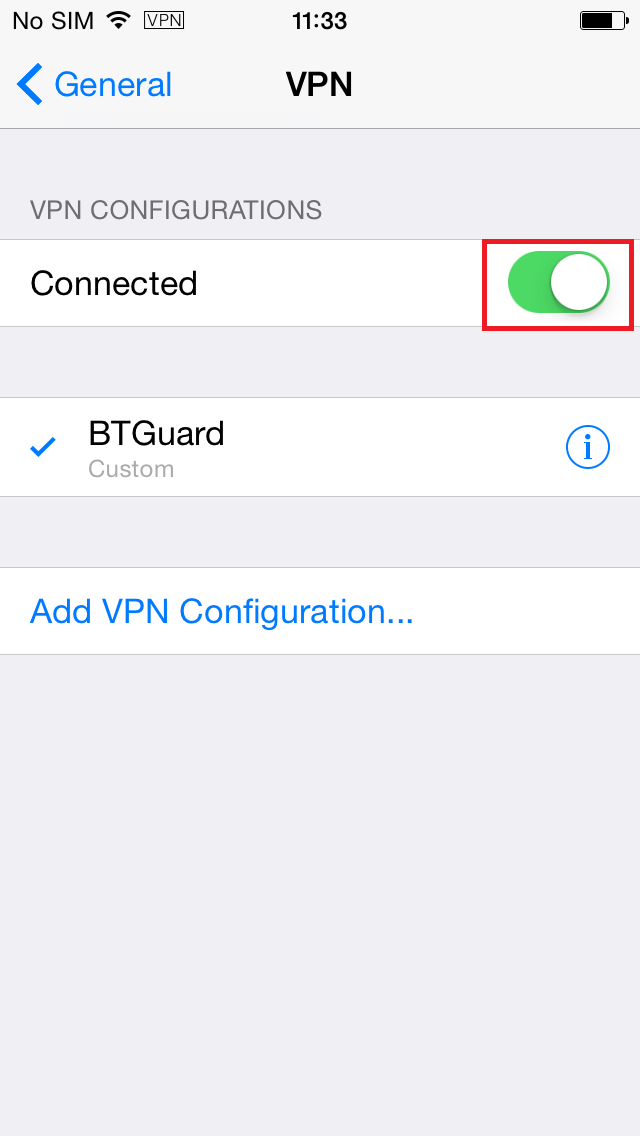
You are now connected!
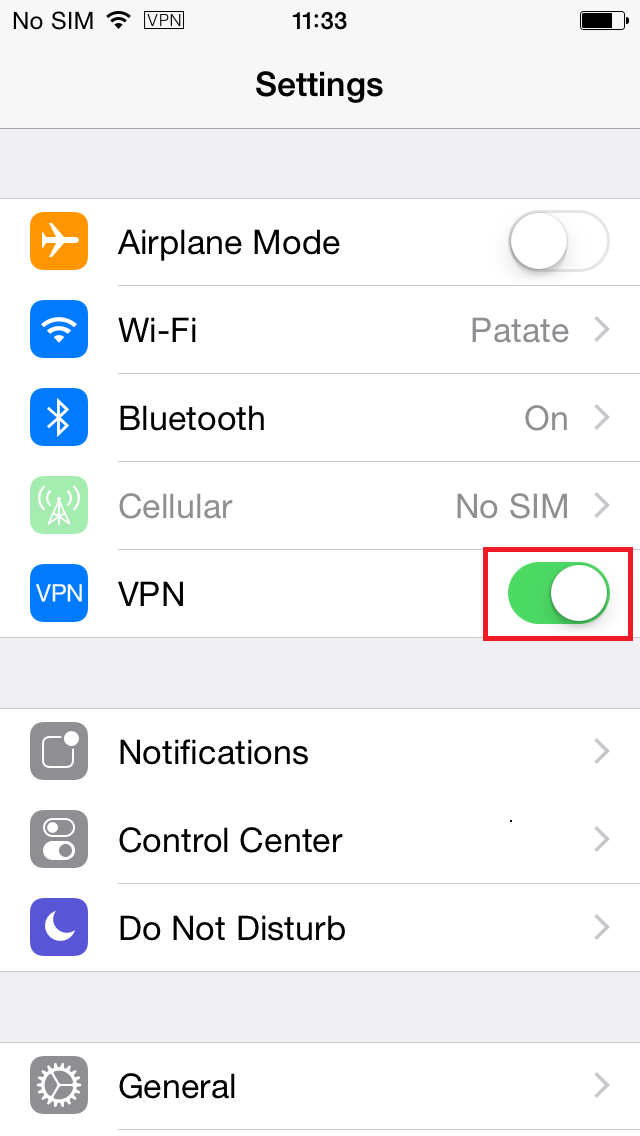
You can also connect from the main Settings page.
